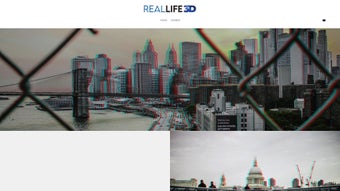

Download Reallife3d – AI‑Powered 2D‑to‑3D Converter for VR, YouTube VR & Oculus
Overview: Transform Your 2D Images into Immersive 3D Experiences
Reallife3d is a cutting‑edge, AI‑driven software that turns ordinary 2D photos, screenshots, or video frames into stereoscopic 3D content ready for virtual‑reality platforms such as YouTube VR, Oculus, and other popular 3D viewers. By leveraging deep‑learning models trained on millions of image pairs, the tool reconstructs depth information and generates left‑right eye views in a matter of seconds. This dramatically reduces the time, cost, and technical expertise traditionally required for 3D conversion.
Whether you are a content creator looking to add a new dimension to tutorials, a photographer eager to showcase panoramic shots in VR, or a hobbyist experimenting with immersive media, Reallife3d offers a streamlined workflow that requires only a single click after installation. The cloud‑enabled service eliminates the need for powerful local hardware; the heavy lifting is performed on secure servers, ensuring fast processing and data privacy. In addition to speed, Reallife3d’s pricing model is transparent and affordable, making professional‑grade 3D conversion accessible to creators of any budget.
The platform’s focus on simplicity, speed, and cost‑effectiveness has positioned it as a valuable resource for anyone wanting to bring depth to visual storytelling, while its robust security measures guarantee that uploaded images are encrypted and automatically deleted after conversion. This combination of advanced AI, cloud convenience, and user‑centric design makes Reallife3d a standout tool in the rapidly growing VR content market.
Key Features, Installation & Compatibility: Getting Started Quickly
Feature Highlights
- Instant 2D‑to‑3D conversion: Upload a single image and receive a stereoscopic pair in under a minute.
- Multiple output formats: Side‑by‑side, VR180, anaglyph, and custom formats for YouTube VR, Oculus, and other platforms.
- AI depth estimation: Deep‑learning models generate accurate depth maps, preserving details in complex scenes.
- Batch processing: Convert entire folders of images at once, ideal for series or timelapse projects.
- Cloud‑based rendering: No high‑end GPU required; processing is done securely on Reallife3d’s servers.
- Preview & adjustment tools: Real‑time side‑by‑side comparison, depth sliders, and color correction before export.
- Cross‑platform compatibility: Export files that work on Windows, macOS, Android, iOS, and major VR headsets.
- Secure data handling: End‑to‑end encryption ensures uploaded images are deleted after processing.
- Cost‑effective pricing: Pay‑per‑image or subscription plans that scale with your workload.
- Regular updates: Continuous AI model improvements and new output options released monthly.
Installation & First‑Run Workflow
Getting started with Reallife3d is intentionally straightforward. The software is primarily offered as a web‑based service, meaning there is no heavyweight installer to download. Users simply create a free account on the official website, verify their email, and they are ready to upload images from any internet‑connected device. For teams that prefer a desktop client, Reallife3d provides lightweight installers for Windows 10/11 and macOS 12 and later. The installers are under 50 MB, and the setup wizard walks you through the necessary permissions, such as network access for cloud processing.
After installation, launch the application and log in with your credentials. The main dashboard presents a drag‑and‑drop zone, a file‑browser button, and a “Batch Upload” option for multiple images. Once files are selected, you choose the desired output format, adjust optional depth sliders, and hit “Convert.” The AI engine runs on Reallife3d’s secure cloud, and you receive a notification when the job is complete. Processed files are stored temporarily in an encrypted cloud folder, from which you can download them directly to your device or push them to cloud storage services like Google Drive or Dropbox.
Supported operating systems:
- Windows 10, Windows 11 (64‑bit)
- macOS 12 Monterey and newer (Intel & Apple Silicon)
- Linux (via web interface – no native client)
- Android 8.0+ (mobile web app, no installation required)
- iOS 13+ (Safari web app, full feature set)
The mobile web version is optimized for touch input, allowing creators to convert images directly from their phones or tablets—perfect for on‑the‑go shooting. For VR developers, Reallife3d exports are compatible with Unity and Unreal Engine through standard stereoscopic file formats, simplifying integration into immersive projects. Additionally, the platform supports API access for automated workflows, enabling developers to embed conversion capabilities into custom pipelines or content management systems. Overall, the installation experience is minimal, the UI is intuitive, and the broad OS support ensures that virtually any user can benefit from Reallife3d’s AI‑powered conversion capabilities.
Pros, Cons, and Frequently Asked Questions
Pros
- Lightning‑fast AI conversion eliminates lengthy manual 3D modeling.
- Multiple export formats cover the most popular VR and 3D platforms.
- Cloud‑based processing removes the need for high‑end hardware.
- Transparent pricing with both per‑image and subscription options.
- Secure, encrypted handling of user data with automatic deletion after processing.
- Batch processing saves time on large projects.
- API integration enables automated pipelines for professional studios.
Cons
- Reliance on internet connectivity; offline conversion is not available.
- Depth accuracy may vary with extremely low‑contrast or highly abstract images.
- Advanced post‑processing features (e.g., custom disparity maps) are limited.
- Free tier imposes a daily conversion limit, which may be restrictive for heavy users.
- Large‑resolution uploads are downscaled automatically to preserve server performance.
FAQ – Your Questions Answered
Can Reallife3d handle video frames or only still images?
Yes. While the primary interface focuses on single images, you can upload a sequence of frames extracted from a video. Reallife3d will process each frame individually, and you can later reassemble them into a stereoscopic video using standard editing tools.
Is there a limit to the resolution of images I can upload?
The platform supports up to 8 K resolution (7680 × 4320 px). Larger files are accepted but will be downscaled automatically to maintain processing speed and server load.
How secure is my uploaded content?
All uploads are encrypted in transit (TLS 1.3) and at rest. After conversion, files are stored for a maximum of 24 hours before being permanently deleted from the server.
Can I integrate Reallife3d into my existing VR production pipeline?
Absolutely. Reallife3d offers a RESTful API with authentication tokens, allowing automated uploads and downloads. Exported stereoscopic files are compatible with Unity, Unreal Engine, and most VR SDKs.
What payment options are available for the subscription plan?
Subscriptions can be paid via credit card, PayPal, or major cryptocurrencies. Monthly and annual plans are available, with a discount for the yearly commitment.
Is there a free trial, and what are its limitations?
Reallife3d offers a free tier that allows up to five conversions per day with a maximum resolution of 4 K. This is ideal for testing the service before committing to a paid plan.
Overall Rating: 4.5 / 5
Conclusion: Elevate Your Visuals with Reallife3d Today
Reallife3d delivers on its promise to democratize 3D conversion, turning ordinary 2D photos into immersive VR experiences with just a few clicks. Its AI‑driven depth estimation, multi‑format export options, and cloud‑based architecture make it a versatile tool for creators ranging from hobbyist photographers to professional VR studios. While an internet connection is required and the free tier imposes modest limits, the platform’s speed, security, and affordability outweigh these minor constraints. By integrating seamlessly with popular editing suites and offering robust API support, Reallife3d fits comfortably into both ad‑hoc projects and large‑scale production pipelines.
If you’re looking to expand your content library into the third dimension without investing in expensive hardware or learning complex stereoscopic workflows, Reallife3d is the solution to consider. Visit the official website, create a free account, and experience the transformation of your images into captivating 3D worlds. Unlock the full potential of your visual storytelling—download Reallife3d now and step into the future of immersive media.
Download Reallife3d today and start creating immersive experiences that captivate audiences across YouTube VR, Oculus, and beyond.



.png)



